
This guide is not a collection of basic ASO tips. If you are still looking at “Popularity” scores and “Number of competitors” to choose your app’s keywords, you are effectively using a 2021 playbook for a 2026 market. You are losing.
The reality of App Store Optimization has shifted. Since Apple dismantled the reliability of public popularity data in late 2025, the industry’s standard metrics have become vanity metrics. Most tools on the market are feeding you guesses based on outdated scraped data.
To rank today, you need to ignore the noise and focus on three brutal truths:
- Popularity is a lie: High-volume keywords are often “Ad Polluted” zones where Apple inserts so many ad slots that organic ranking is mathematically worthless.
- Difficulty is a trap: Counting how many apps use a keyword is useless. What matters is the Top 10 SERP Health: the age of the top apps, their movement, and their screenshot conversion power.
- Static ASO is dead: Keywords are not “set and forget.” You need to track real-time volatility in the Top 10 to spot when a SERP is opening up for a new entry.
In this more 8,000-word breakdown, we dismantle the myths sold by expensive web-based ASO platforms and show you the exact framework to identify “unpolluted” keywords, analyze SERP stability, and use native data to actually grow your impressions.
Here is the data-driven roadmap to mastering ASO keywords in 2026.
1. Why “Popularity” is a Dead Metric (The 2025 Shift)
Let’s be direct: if your current ASO tool shows you a “Popularity” or “Search Volume” score of 65 and you base your strategy on that, you are gambling.
By the end of 2025, Apple finalized a series of privacy and API changes that effectively blinded third-party platforms. The “Popularity” scores you see today in most web-based tools are simulations. They are estimates of estimates.
Data is the lifeblood of ASO, but it is also a source of confusion. Apple’s 0 to 100 popularity score is a black box that hides as much as it reveals. To learn how to synthesize fragmented signals and uncover the ‘Golden Zone’ of search volume, explore our guide on Decoding Apple’s Fragmented Popularity Data.
The fragmenting of the Search Index
Apple now fragments data based on deeper user intent and localized clusters. This means a keyword might look “popular” in a general tool, but for your specific app category, the actual reachable traffic is a fraction of that number.
Scaling globally is not a matter of translation, but a matter of cultural resonance. To capture international markets, you must look at how local users search and interact with their specific storefronts. Master the art of ‘transcreation’ with our guide on Keyword Localization: Beyond Translation.
Stop chasing ghosts
Relying on these scores leads to the “Ghost Traffic Trap.” You rank #3 for a high-popularity keyword, yet your impressions don’t move. Why? Because the data was wrong. In 2026, the only way to gauge a keyword’s value is to look at the Top 10 Movement.
If the top 10 apps are shifting positions every week, there is real traffic and an active algorithm. If the top 10 is frozen, the “Popularity” score is a ghost the keyword is either dead or locked by legacy apps that Apple won’t move.
Beyond the 0-100 Score
Smart developers have stopped asking “How popular is this?” and started asking “How profitable is the gap?”. You need to look at the metadata of the apps currently holding the top spots. Are they updating? Are they optimized? If a keyword has a popularity of 80 but the top 5 apps haven’t updated their metadata in 6 months, that score is fake. Apple is simply filling a void.
2. The “Difficulty” Trap: Why Competitor Count is a Useless Metric
Most ASO tools calculate “Difficulty” using a lazy formula: they count how many apps are indexed on a keyword. This is not just oversimplified: it is fundamentally wrong.
If a keyword has 5,000 competing apps, but 4,990 of them are “zombie apps” with zero updates in two years and no active user base, the keyword is actually easy. Conversely, a keyword with only 50 competitors might be impossible if those 50 apps are backed by multi-million dollar budgets and have occupied the Top 10 since 2022.
The Myth of “Number of Apps”
The sheer volume of competition is a vanity metric. In 2026, the App Store is a graveyard of abandoned projects. When a tool tells you a keyword is “Hard” because 10,000 apps use it, it’s failing to tell you that 99% of those apps have zero authority.
You aren’t competing against 10,000 apps. You are competing against the Top 10.
SERP Health: The Real Difficulty Indicator
To understand if you can actually rank, you must analyze the Top 10 SERP Health. At Altis ASO, we look at the data points that actually move the needle:
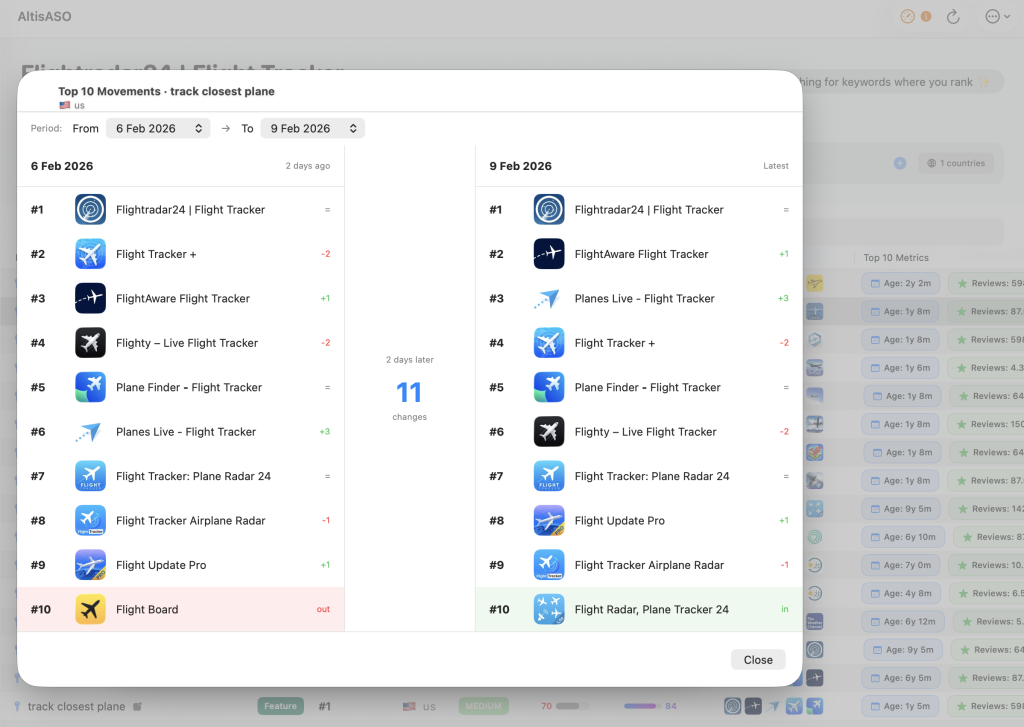
- SERP Volatility: Are the top apps moving? If the rankings for a keyword haven’t changed in three months, that SERP is “frozen.” Apple has decided those apps belong there, and dislodging them will require a massive spike in external traffic. A “volatile” SERP, even with high-authority apps, is a SERP where you can play.
- The Age of the SERP: If the Top 10 is dominated by apps that have been there for 4+ years, the “entry barrier” is high. Apple’s algorithm grants a “legacy bonus” to long-standing apps with millions of historical reviews.
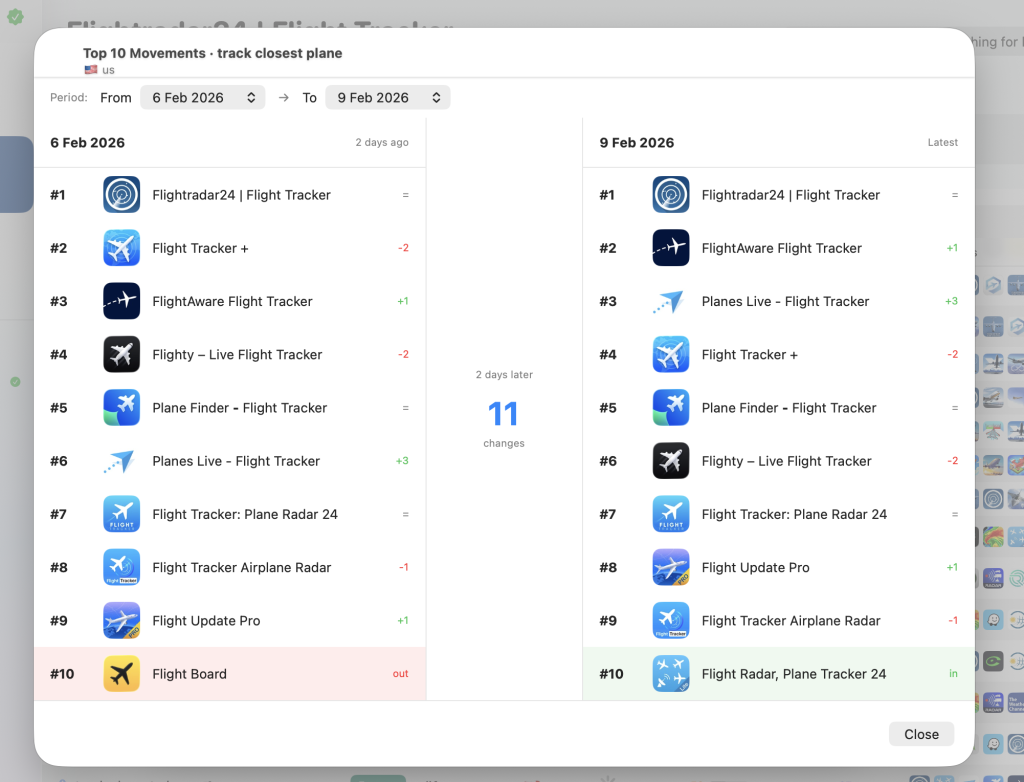
- Movement Tracking: This is the critical edge. Most tools give you a snapshot. Altis tracks the movements within the Top 10. If you see a new app suddenly climb from #80 to #12 in a week, you’ve just found a “weak” keyword where the algorithm is actively looking for fresh content.
Why Your Current Tool Makes You Fail
Most of our competitors diabolically simplify difficulty because it’s cheaper for them to process. They scrape the “Total Results” count and turn it into a 0–100 score.
This leads developers to attack keywords that are “Inattainable.” You see a difficulty of 20, you optimize for it, and six months later, you are still at rank #95. Why? Because the Top 10 is a fortress of legacy apps, regardless of how many total apps are in the list.
Stop looking at the crowd. Start looking at the leaders. If the Top 10 shows signs of decay (no updates, dropping ratings, stale screenshots), that is your signal to strike, regardless of what the “Difficulty” score says.
3. The “Ad Pollution” Metric: Why Your Organic Rank is Invisible
You found a keyword with great traffic. You optimized your metadata. You finally hit the Top 3. You check your analytics, and the organic impressions are… flat.
In 2026, ranking #1 doesn’t mean what it used to. Between Apple’s aggressive expansion of Search Ads slots and the introduction of new “Suggested” placements, the organic real estate on a smartphone screen has shrunk by over 40% in some categories.
This is what we call Ad Pollution. It is the single most important metric that your current ASO tool is ignoring.
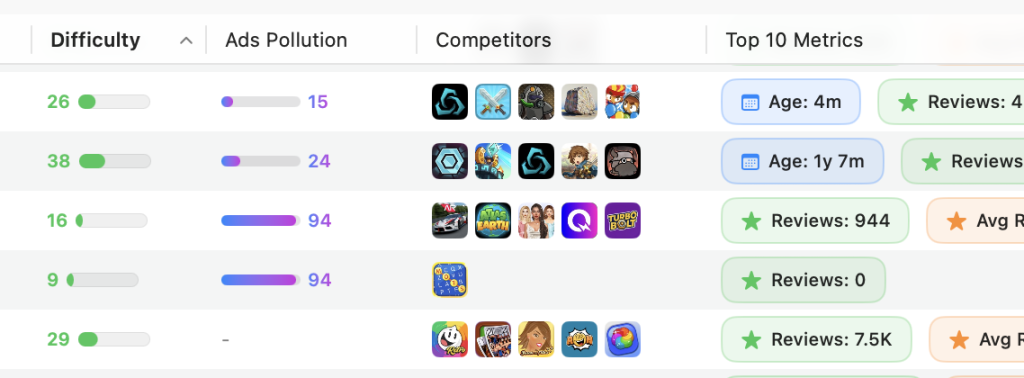
Ranking #1 is a vanity metric if your app is buried under four layers of advertising. In 2026, the real battle is for ‘Clean Real Estate’. To understand how to measure the impact of search ads on your organic visibility, read our guide on Measuring Keyword Ad Pollution for Organic ROI.
The Death of the First Fold
On a modern iPhone, the “First Fold” (what a user sees without scrolling) is now almost entirely pay-to-play.
When a user types a high-intent keyword, they are often met with:
- A massive Search Ads “Hero” banner.
- A secondary Search Ads text-based result.
- A “You might also like” carousel.
By the time the user reaches the first organic result, they have already scrolled past three or four opportunities to download a competitor. If you are ranking #3 for a keyword with “High Ad Pollution,” you are effectively on the second page of search results.
Calculating the “Organic Visibility” Ratio
At Altis ASO, we don’t just look at who is ranking; we look at what is taking up the pixels. Every keyword has a different Pollution Level.
Some keywords are “Protected” because Apple’s algorithm deems the organic intent too specific to clutter with ads. Others are “Money Keywords” where Apple maximizes ad slots. If you choose a keyword with an Ad Pollution score of 80%, you are fighting for a tiny sliver of traffic.
You are better off ranking #1 on a keyword with 400 monthly searches and 0% Ad Pollution than ranking #1 on a keyword with 4,000 searches where 90% of the screen is covered by Search Ads.
The “Cost per Tap” Displacement
Ad Pollution doesn’t just steal your visibility; it increases your difficulty. When a keyword is heavily polluted, big players are bidding high on Search Ads. This creates a feedback loop: Apple sees the high engagement on ads and keeps the ad slots active.
If you are a solo dev or a small studio, attacking an “Ad Polluted” keyword is a suicide mission. You are competing against an unlimited budget that literally pushes your organic listing off the screen.
Spotting “Clean” Keywords
The strategy for 2026 is to find “Clean SERPs.” These are keywords where the intent is so niche or the category so specific that Apple displays minimal ads.
Using Altis, you can identify these gaps. We track the presence and density of ad slots for every keyword in your list. If we see a keyword where the first organic result appears within the first 200 pixels of the screen, that’s a Golden Opportunity. That is a keyword where your ASO efforts will actually translate into downloads, not just ego-boosting rank numbers.
Why Screen Real Estate is the Only KPI
Stop counting “Rankings.” Start counting “Visible Pixels.”
If your app is not visible within the first 1.5 scrolls, it doesn’t exist for the average user. High Ad Pollution turns a “Popular” keyword into a “Dead” keyword for organic growth. This is why thousands of developers are seeing their organic traffic drop despite maintaining their rankings. They aren’t losing the SEO game; they are losing the screen real estate game.
4. Reverse Engineering the Top 10: The Altis Methodology
In the old days of ASO, you would look at a competitor, see their keywords, and copy them. That strategy is now obsolete. In 2026, the App Store algorithm is “Visual-First.” Apple’s AI now scans your screenshots to confirm if your app actually matches the keywords you are claiming in your metadata.
If you want to dominate a SERP, you can’t just look at words. You have to reverse engineer why the Top 10 are there and how long they have been sitting in those seats.
The “SERP Stagnation” Analysis
One of the most dangerous mistakes is attacking a “Frozen SERP.”
Some keywords have a Top 10 that hasn’t changed in eighteen months. This isn’t because those apps are perfect; it’s because Apple has assigned them a high “Trust Score” for that specific search intent. If you try to enter this SERP, you are fighting against years of accumulated data.
At Altis, we track SERP Movement. We look for “Agitated SERPs” where apps are jumping from #12 to #5 or #8 to #15. This volatility is a signal that the algorithm is unhappy with the current results and is actively testing new apps. These are the doors you want to kick down.
Screenshot Semantic Alignment
Apple’s computer vision is now sophisticated enough to understand what is happening in your screenshots. If you target the keyword “Budget Tracker” but your screenshots look like a “Crypto Wallet,” you will never break the Top 10, no matter how many times you put the word in your title.
You must analyze the visual language of the Top 10:
- What is the dominant color palette?
- Are they using “Social Proof” (e.g., “Featured in TechCrunch”) in the first screenshot?
- Is the “Action” clearly visible in the first 2 seconds of the user’s gaze?
If the Top 10 all share a specific visual style, it’s because Apple has learned that users clicking that keyword expect that specific look. Altis allows you to view the screenshots of the entire Top 10 side-by-side on your Mac, so you can spot the “Visual Gap” immediately.
Why Native Tools Beat Web Dashboards
Most ASO platforms are slow, clunky web apps that aggregate data once every 24 hours. When you are reverse engineering a SERP, latency is your enemy.
Altis ASO is built as a Native Mac App. This isn’t just a design choice; it’s a performance requirement. Analyzing the Top 10 movements, comparing high-resolution screenshots, and calculating the “Age of the SERP” requires raw processing power. While your competitors are waiting for a web page to reload, you are already identifying the weak link in the Top 5 and preparing your metadata update.
The “Hidden” Metadata of Winners
Beyond the Title and Subtitle, the Top 10 apps are winning because of their “Conversion Velocity.” Apple rewards apps that convert.
When you reverse engineer a winner, look at their update frequency. An app that updates every 14 days is signaling to Apple that they are “Active.” If you see an app in the Top 3 that hasn’t been updated in 9 months, that is a prime target for displacement. They are holding on by a thread of legacy authority. One well-optimized “Fresh” app can often leapfrog these “Zombie Winners” within two update cycles.
While your Title and Subtitle drive broad visibility, the hidden 100-character field is where the real math of ASO happens. To maximize your character ROI and master the zero-space syntax, check out our deep dive on Hidden 100-Character Field Optimization.
5. Building your 2026 Keyword Semantic Cluster
The era of targeting “individual” keywords is over. If you are still building spreadsheets with single words and trying to rank for them one by one, you are missing how the modern App Store algorithm functions.
In 2026, Apple and Google use semantic clustering. They don’t just look at the word you provided; they look at the “neighborhood” of meaning surrounding your app. If you want to dominate, you need to build a cluster that signals absolute authority on a specific topic.
While the principles of research remain constant, the execution varies wildly between platforms. Apple uses a combinatorial ‘Lego’ logic while Google relies on deep semantic crawling. For a surgical breakdown of these differences, read our technical analysis on ASO Keyword Indexing: iOS vs Android Logic.
Beyond Single Word Rankings
A semantic cluster is a group of related keywords that all point toward the same core intent. For example, if your app is a “Meditation Timer,” your cluster shouldn’t just be “meditation” and “timer.” It must include:
- Core Intent: Meditation, mindfulness, zen.
- Problem/Solution: Anxiety relief, sleep sounds, focus boost.
- Contextual usage: Morning routine, 5-minute break, work stress.
When you rank for a broad range of these related terms, Apple begins to trust your app for the entire category. This creates a “Halo Effect” where ranking for a niche long-tail term actually pushes your ranking up for the high-volume primary keywords.
The “Intent Gap” Strategy
Most developers pick keywords based on what their app is. The winners in 2026 pick keywords based on what the user wants to solve.
By using Altis to explore the “related” suggestions that the App Store actually displays to users, you can find “Intent Gaps.” These are clusters where the big players are too lazy to optimize. They might dominate “Fitness Tracker,” but they are completely missing “Postpartum Recovery Exercise.”
By capturing a semantic cluster in a niche “Intent Gap,” you build the initial conversion velocity needed to later attack the broader, more competitive clusters.
Priority Mapping: Conversion > Volume
In 2026, the weight of your cluster should be skewed toward conversion.
- Tier 1 (Foundation): High-relevance, low-pollution keywords where your app is a perfect match. This is where you get your first 30 keywords for tracking.
- Tier 2 (Growth): Medium-difficulty terms that are part of the same semantic family.
- Tier 3 (Authority): The “trophy” keywords that you will eventually hit once your Tier 1 and Tier 2 rankings have proven your app’s worth to the algorithm.

Structuring Your Metadata for Clusters
Don’t repeat the same words. If “Meditation” is in your Title, don’t waste space putting it in your Subtitle or Keyword Field.
The goal is to maximize the unique “meaning units” within your metadata. By using a native tool like Altis, you can visualize your entire semantic footprint across your Title, Subtitle, and the hidden 100-character field to ensure you aren’t leaving any gaps in your cluster. This “Metadata Coverage” is what separates the top 1% of apps from the rest of the store.
6. Execution: From Research to Metadata Injection
Research is only half the battle. The most common point of failure for developers is the actual “injection” of these keywords into the App Store Connect fields. In 2026, the algorithm is hyper-sensitive to “Keyword Stuffing.” If your metadata looks like a list of tags instead of a coherent product description, Apple will penalize your ranking authority.
The Hierarchy of Indexation
Not all metadata fields are created equal. You must distribute your semantic cluster based on the “weight” Apple assigns to each field:
- App Title (30 chars): This is your strongest signal. It must contain your primary, high-intent keyword. Do not waste space on your brand name if nobody is searching for it yet.
- Subtitle (30 chars): This supports the title. Use this space to include your secondary cluster keywords that explain the “Benefit” (e.g., “Deep Sleep & Anxiety Relief”).
- Keyword Field (100 chars): This is the “hidden” engine. This is where you put the remaining keywords from your cluster. Use commas, no spaces, and never repeat a word that is already in your Title or Subtitle.
Avoiding the “Over-Optimization” Trap
There is a tipping point where adding more keywords actually dilutes your power. If you try to rank for 50 different things at once, you rank for nothing.
The strategy for 2026 is Thematic Concentration. Focus your metadata on one or two tight semantic clusters per update. If you are a fitness app, don’t try to target “Yoga,” “HIIT,” and “Calorie Tracker” all in the same 100 characters. Pick a theme, dominate it, and then rotate your “Keyword Field” in the next update based on the data you see in Altis.
The “Native” Advantage in Iteration
Because Altis is a native Mac app, the workflow between research and injection is seamless. You can simulate how your Title and Subtitle will look on a real device before you hit “Submit” in App Store Connect.
Testing different “Metadata Variations” is the only way to find what resonates with both the algorithm and the human user. Remember: the algorithm gets you the impression, but the human gets you the download. If your Title is unreadable because it’s a string of keywords, your conversion rate (CVR) will tank, and Apple will quickly drop your ranking.
Localizing for Regional Clusters
A keyword that works in the US might have zero “Cultural Popularity” in the UK or Australia, even if the language is the same.
Execution in 2026 requires localizing your metadata for every storefront. You shouldn’t just translate; you should perform a “Cluster Audit” for each territory. Using the 30 free keyword slots in Altis allows you to track these variations across different countries to ensure your execution isn’t being wasted on dead markets.
7. Tracking and Iteration: The ASO Feedback Loop
The biggest mistake you can make is thinking ASO is a one-time task. You don’t “do” ASO; you maintain it. In a market where Apple updates its search algorithms and ad placements constantly, a keyword list that worked in January will likely be obsolete by April.
The 30-Day Audit Cycle
If you aren’t checking your keyword movements at least once a week, you are flying blind. The App Store is a living ecosystem. New competitors enter the fray, legacy apps lose their “update freshness” bonus, and user search trends shift.
A professional tracking strategy involves:
- Identifying Decay: Spotting when a keyword starts losing its conversion power before it affects your bottom line.
- Spotting Opportunities: Noticing when a competitor drops in rank, leaving a gap in the Top 10.
- Algorithm Shifts: Detecting sudden, store-wide volatility that signals a change in how Apple weights metadata.
Why Small Samples Win
You don’t need to track 500 keywords. That is noise. You need to track the 30 keywords that actually drive your revenue. By focusing on a tight list, you can see the “micro-movements” that massive automated tools miss.
If you see your app bounce between position #4 and #6 daily, it means the algorithm is “testing” your conversion rate against the apps around you. This is your cue to look at your screenshots. If your rank is stable but your impressions are dropping, it is time to check the “Ad Pollution” on that specific SERP.
The “Pivot or Persevere” Decision
Tracking gives you the data to make the hard calls. If you have been targeting a high-difficulty keyword for two months and haven’t cracked the Top 20, the data is telling you to pivot.
Instead of banging your head against a “Frozen SERP,” you use your tracking data to find “Rising Stars” keywords with growing movement but low competition. You then reallocate your metadata real estate to these new terms. This agile approach is how small studios outmaneuver massive corporations with million-dollar ASO budgets.
Closing the Loop
Every update you push to the App Store is a test. You change the metadata, you wait 7 to 10 days for the index to stabilize, and you check the tracking. If the needle moves up, you double down. If it moves down, you revert and analyze why.
This feedback loop is the only “secret” to long-term ASO success. It is not about a magic keyword; it is about the discipline of constant, data-driven iteration.
8. The Conversion-Rank Correlation: Why “Taps” are the New Keywords
In 2026, the App Store algorithm has moved beyond simple text matching. Apple’s primary goal is to show apps that users actually download. This means your “Conversion Rate per Keyword” is now a direct ranking signal. If you rank for a keyword but nobody taps on your app, Apple will demote you within days, regardless of how many times that word appears in your title.
The CTR (Click-Through Rate) Death Spiral
If your app appears at #3 for the keyword “Personal Finance,” but users consistently bypass you to click on #4, the algorithm registers a “Relevance Gap.” Apple assumes that even though your metadata says you are a finance app, the users disagree.
This creates a death spiral. Low CTR leads to lower rankings, which leads to even lower visibility. To fix your keywords, you often have to fix your “First Look.” In 2026, a keyword strategy that doesn’t include a visual optimization plan is half-baked.
Understanding “Download Velocity”
Apple looks at how many downloads you generate from a specific search term within a rolling window of 24 to 72 hours. This is “Download Velocity.”
If you are launching a new keyword strategy, you need a spike in velocity to “bridge the gap” into the Top 10. This is why aggressive ASO practitioners often sync their metadata updates with external traffic bursts. You aren’t just telling Apple you are relevant; you are proving it with real-time data.
The Feedback Loop of High-Intent Terms
Not all downloads are equal. A download from a “High-Intent” keyword (e.g., “Buy life insurance”) carries more weight in the algorithm than a download from a generic term (e.g., “Finance”).
The algorithm tracks the “Post-Download” behavior. If users download your app via a specific keyword and then delete it within 30 seconds, your ranking for that keyword will tank. Why? Because you failed the “Utility Test.” In 2026, “Keyword Quality” is measured by the retention of the users that the keyword brought in.
9. Keyword Cannibalization and Apple’s Semantic Overlap
One of the most frequent mistakes in professional ASO is “Keyword Cannibalization.” This happens when you try to target the same core keyword across too many different fields or across different apps in the same developer account, confusing the algorithm’s “Intent Map” for your product.
The Rule of Uniqueness
In 2026, repeating a keyword across your Title, Subtitle, and Keyword Field does not “strengthen” the signal. It dilutes your limited character real estate. Apple’s indexing engine is smart enough to combine words from different fields.
If your title is “Yoga Tracker” and your subtitle is “Fitness Routine,” you are already indexed for “Yoga Fitness” and “Yoga Routine.” If you put “Yoga” again in your 100-character keyword field, you are wasting space that could be used for “Pilates” or “Stretching.” You are effectively paying for the same pixel twice.
Pluralization and Stop Words
Stop wasting characters on “and,” “the,” “for,” or “with.” Apple’s 2026 algorithm automatically filters these out. Similarly, the engine now treats most singular and plural forms as identical “meaning units.”
If you rank for “Workout,” you will almost certainly rank for “Workouts.” Don’t waste space on both. Instead, use that space to broaden your semantic net. Every character you save is an opportunity to capture a new niche intent that your competitors are ignoring.
The “Over-Indexing” Penalty
There is a growing body of evidence that “Keyword Stuffing” the hidden field with 100 characters of unrelated, high-volume terms can trigger a “Relevance Penalty.”
If your app is a simple “Calculator” but your keyword field is packed with “Weather,” “News,” and “Social Media,” the algorithm loses confidence in what your app actually does. In 2026, the goal is “Thematic Density.” Your keyword field should be a tight, logical extension of your primary cluster, not a random list of popular words.
10. Visual Intelligence: How Screenshots Validate your Keywords
In 2026, the relationship between text and imagery is no longer separate. Apple’s App Store algorithm uses advanced computer vision to ensure that what a user sees matches what they searched for. If there is a “Visual Mismatch,” your keyword rankings will stall, regardless of your metadata strength.
The OCR (Optical Character Recognition) Factor
Apple’s algorithm now reads the text inside your screenshots. If you are targeting the keyword “Expense Tracker,” but your first three screenshots only talk about “Investment Portfolios,” the algorithm detects a relevancy gap.
The keywords you use in your Title and Subtitle should be mirrored in the captions of your first two screenshots. This creates a “Semantic Confirmation” for the store’s AI. When the text in your metadata aligns with the text in your images, Apple’s confidence score in your app’s relevancy increases, leading to more stable rankings during algorithm shifts.
Visual Context and Category Alignment
The algorithm also analyzes the “scene” of your screenshots. It can distinguish between a gaming interface, a utility dashboard, and a social feed.
If you attempt to rank for “Professional Networking” but your screenshots feature bright, casual, game-like graphics, you are fighting an uphill battle. The algorithm expects a certain “Visual Signature” for specific keyword clusters. Before you finalize your keyword list, look at the Top 10. If they all use a “Dark Mode” aesthetic with minimalist fonts, that is what the algorithm (and the users) have deemed relevant for that search term.
The Video Preview Multiplier
App Previews (videos) are high-signal assets. In 2026, Apple uses the metadata within the video file and the actual frames to determine content.
A video that demonstrates the “Core Action” associated with your primary keyword can drastically improve your ranking speed. If your keyword is “Video Editor,” and your preview video shows a user actually cutting and trimming clips, the algorithm treats this as a “Proof of Utility.” This is why apps with high-quality, keyword-aligned videos often leapfrog apps that only use static images.
11. The “Update Freshness” Decay Curve
One of the most misunderstood components of ASO keyword ranking is the “Freshness” factor. Apple rewards active developers. In 2026, a “set it and forget it” approach is a guarantee of slow decay.
The 14-Day Indexing Window
When you update your metadata, Apple triggers a re-indexing phase. For the first 7 to 14 days, your app experiences a “Discovery Boost” where the algorithm tests your new keywords in various positions.
This window is critical. During this time, the algorithm is hyper-sensitive to your conversion rate. If you don’t generate enough “Download Velocity” during this window, your app will settle into a lower position. Frequent, meaningful updates (every 2 to 4 weeks) keep this “Freshness” signal alive.
Combatting “Keyword Stagnation”
Keywords have a shelf life. A term that was a goldmine six months ago might now be “Ad Polluted” or abandoned by users.
“Stagnation” happens when your rankings remain flat but your impressions slowly trend downward. This is a sign that while your position hasn’t changed, the keyword itself is losing value. Professional ASO requires pruning your keyword list like a garden. You must cut the underperforming “Legacy” words to make room for emerging “Trend” words.
The “Update Note” Secret
While the “What’s New” text is not directly indexed for search in the App Store, it affects user conversion, which in turn affects your ranking.
Smart developers use this field to reinforce their keyword strategy. Mentioning a new feature that matches a newly targeted keyword (e.g., “Now with Dark Mode for better Night Reading”) signals to users that the app is evolving. High conversion on a new version signals to Apple that the update was a success, reinforcing your new keyword positions.
12. Protecting your Brand: Defensive Keyword Strategies
As you climb the rankings, you will inevitably become a target. Competitors will bid on your brand name in Search Ads or attempt to rank for “Alternative to [Your App Name].” A 2026 keyword strategy must include a defensive layer.
Brand Name Hijacking
If you don’t include your own brand name effectively in your strategy, you are leaving the door open for others. While you shouldn’t waste Title space on your brand if you are unknown, once you have traction, your brand becomes a high-intent keyword.
Monitor the SERP for your own brand name. If you see competitors appearing above you via Search Ads or highly optimized “Comparison” articles, you need to adjust. This often means using your Subtitle to reinforce your brand identity or using your 100-character field to capture common misspellings of your app’s name.
The “Competitor Comparison” Play
In 2026, users often search for “App A vs App B.” If you aren’t part of that conversation, you are losing users at the bottom of the funnel.
While you cannot use competitor brand names in your metadata fields (Apple will reject the build), you can target the “Problem” those competitors solve. If a competitor is known for “Fast Invoicing,” you ensure your metadata emphasizes your “Speed” and “Invoicing” capabilities. You are competing for the intent, even if you can’t mention the name.
Managing Negative Keywords
In the world of paid search ads that supplement your ASO, “Negative Keywords” are vital. You don’t want to pay for traffic that doesn’t convert, as low conversion on paid ads can actually have a negative “Drag Effect” on your organic authority.
By identifying keywords that bring “Lookers” but not “Buyers,” you can refine your organic list to focus only on the most profitable clusters. This synergy between paid data and organic execution is what defines the most successful apps in 2026.
13. Seasonal Swings: Temporary Keyword Clusters for 2026
ASO is not a static mountain; it is a tidal system. If your keyword strategy remains the same in July as it was in December, you are ignoring the cyclical nature of human behavior. In 2026, Apple’s algorithm has become incredibly efficient at identifying “Seasonal Intent,” rewarding apps that adapt their metadata to the current moment.
The Lifecycle of a Seasonal Cluster
Seasonal keywords have a distinct “Peak and Crash” profile. You cannot wait for the holiday to arrive to start your optimization. The algorithm requires a lead time to index and trust your app for these temporary terms.
- The Warm-up (4 weeks prior): Injecting seasonal terms into your hidden keyword field to build baseline relevancy.
- The Peak (The Event): Moving those terms to the Subtitle or Title to maximize conversion when search volume spikes.
- The Cool-down (2 weeks post): Rotating back to your “Evergreen” keywords to avoid a conversion cliff.
Keywords are not permanent assets; they are living entities that evolve. Understanding when a token is in its ‘incubation’ phase versus when it is entering ‘decay’ is essential to maintain your organic momentum. Learn how to manage your metadata over time in our final chapter: The Lifecycle of an ASO Keyword: From Trend to Decay.
Identifying “Micro-Seasons”
Beyond the obvious (Christmas, Black Friday, New Year), 2026 is the year of “Micro-Seasons.” These are niche events, like Tax Season for finance apps, Back to School for productivity tools, or even specific Viral Trends.
By tracking these micro-swings, you can capture massive traffic with very low competition. While everyone is fighting for “Fitness,” you are winning “Summer Body Challenge” or “Post-Holiday Detox.” These clusters are highly profitable because the user intent is urgent and specific.
Seasonal Visual Alignment
Keywords like “Gift” or “Resolution” only work if your screenshots back them up. During a seasonal pivot, your first two screenshots should reflect the theme. If you target “New Year Resolutions,” your visuals should display a “Fresh Start” UI or a goal-tracking feature. This visual “Double-Down” tells the algorithm that your app is the most relevant answer for that specific, time-limited query.
14. The Future of Search: Beyond Exact Match
We are entering the era of “Contextual Search.” Apple’s 2026 search engine is moving away from the rigid “Exact Match” of the past decade. The algorithm now understands synonyms, related concepts, and even the “Mood” of a search.
Semantic Search and Latent Intent
Apple’s AI can now connect the dots between “Calm,” “Anxiety,” and “Meditation” without you needing to repeat every single variation. This is known as Latent Semantic Indexing (LSI).
The strategy for the future is to build a “Metadata Cloud” that covers the widest possible area of meaning. Instead of obsessing over whether to use “Photo Editor” or “Picture Editor,” you should use that space to add a different concept, like “Filter” or “Retouch.” The algorithm will handle the synonyms; your job is to provide the breadth.
Voice Search and Natural Language
As more users search via Siri or voice-to-text, search queries are becoming longer and more conversational. People aren’t just typing “Weather”; they are saying “Will it rain today?”.
This shift favors apps that use “Long-Tail Intent” in their keyword fields. Including question-based keywords or natural language phrases helps you capture this growing segment of voice-driven traffic. It’s no longer just about the noun; it’s about the verb and the context.
The Role of User Behavior as Metadata
Ultimately, the future of ASO keywords is a “User-Generated” signal. Apple is increasingly using the words users write in your Reviews as metadata for search.
If users constantly mention that your app is a “Great habit tracker for ADHD,” you will eventually start ranking for “ADHD habit tracker,” even if that term isn’t in your metadata. In 2026, your keyword strategy must include a “Review Mining” phase where you identify the language your users use and reflect it back in your official metadata. This creates a perfect loop between user perception and algorithmic ranking.
15. The Geometry of the Scroll: Understanding User Attention Depth
In 2026, ranking #5 is not half as good as ranking #1. It is often 90% worse. To build a keyword strategy that actually converts, you have to understand the “Geometry of the Scroll”: the physical way a user interacts with the search results on an iPhone or iPad.
The “Thumb-Zone” and the First Three Results
Heatmaps of the App Store in 2026 show a brutal concentration of attention. Over 70% of all downloads occur within the first three organic results. If your keyword strategy targets high-volume terms where you can only reach #6, you are fighting for scraps.
This is where the “Difficulty” metric fails you again. A keyword with a “Low” difficulty that places you at #1 is infinitely more valuable than a “High” popularity keyword that places you at #7. You must optimize for the Top 3 or Nothing. If you cannot realistically crack the Top 3 based on your current authority, you must pivot your semantic cluster to a more specific niche.
Visibility is not just about having the right words; it is about where you place them. Apple’s algorithm assigns different values to your metadata fields, making the hierarchy between your 30-character strings critical. To master this distribution, read our full analysis on App Title vs Subtitle Keyword Weighting.
The “Scroll Fatigue” Threshold
There is a measurable point in a search session where a user stops looking for “The Best” app and starts looking for “Any” app that looks halfway decent. This usually happens around the 4th scroll.
Keywords that trigger high “Scroll Fatigue” are usually generic terms like “Games” or “Tools.” Users scroll endlessly, their attention span drops, and your screenshots have less than half a second to make an impression. A high-value keyword strategy avoids these “Fatigue Zones” and focuses on “Precision Queries” where the user is highly motivated to find a specific solution quickly.
Pixel Real Estate vs. Ranking Position
Not all rankings are equal in size. An app with a “Video Preview” occupies more vertical pixels than an app with only screenshots. If the apps ranking at #1 and #2 both have videos, they are effectively pushing the #3 result off the first screen.
When you choose your keywords, you must look at the “Visual Weight” of the competitors. If the Top 3 are “Heavy” (videos, large captions, high-rated reviews featured), your #4 rank will be invisible. You are better off attacking a SERP where the leaders are “Light,” allowing your app to peek through even at a lower rank.
16. Localized Semantic Mapping: Beyond Simple Translation
One of the greatest wastes of potential in ASO is “Lazy Localization.” Many developers simply translate their English keywords into Spanish or French and wonder why their international growth is non-existent. In 2026, you aren’t translating words; you are translating Search Culture.
Understanding the psychology of your users is just as important as the keywords themselves. Global search behavior is divided into cultural clusters that dictate how users interact with your metadata. To bridge the gap between technical ASO and regional intent, read our deep dive on Cultural Intent in Global ASO Clusters.
The “Slang and Dialect” Alpha
In many markets, the official name for an object is not what people type into the search bar. For example, a “Flashlight” app in the US is a “Torch” in the UK. But it goes deeper. In Latin America, the “Slang” for money or saving differs between Mexico, Argentina, and Colombia.
If you use the “Official” dictionary term in your metadata, you are missing the high-intent traffic from users who search using natural, local language. A professional strategy involves “Local Intent Mining”, finding the specific regional clusters that are ignored by the big, globalized apps.
Character Efficiency in Multi-Language Stores
Some languages are “denser” than others. You can fit more “meaning” into 30 characters of Japanese or Chinese than you can in English. Conversely, German words are notoriously long, often eating up half a Title with a single compound noun.
In 2026, you must adapt your keyword strategy to the “Character Density” of the language. In English, you focus on phrases. In Japanese, you focus on a wider variety of kanji and katakana combinations. This is why a “One Size Fits All” keyword list is a recipe for failure. You need a native-level understanding of how users in that specific storefront condense their thoughts into a search query.
The “Cross-Localization” Indexing Hack
Many developers don’t realize that certain storefronts index keywords from other languages. For example, the US App Store often indexes keywords from the “Spanish (Mexico)” localization.
This is a massive opportunity to “expand” your 100-character keyword field. By strategically placing different clusters in your secondary localized metadata, you can effectively double or triple the number of keywords your app ranks for in your primary market. This is a “Black Belt” ASO tactic that requires precise tracking to ensure the signals aren’t conflicting.
17. The “Ad Drag” Effect: How Paid Search Manipulates Organic Data
In 2026, the wall between Apple Search Ads (ASA) and organic ASO has crumbled. While Apple officially claims that spending money on ads doesn’t “directly” improve your organic rank, the secondary effects what we call the “Ad Drag” are undeniable.
Artificial Velocity and Ranking Spikes
When you run a high-volume ad campaign on a specific keyword, you are generating a massive spike in “Download Velocity.” Apple’s organic algorithm sees this surge in downloads for that keyword and concludes that your app is trending and highly relevant.
The result? Your organic ranking climbs. However, this is a “Borrowed Rank.” If you stop the ad spend and your organic conversion rate (CVR) doesn’t hold up, your rank will crash. A smart keyword strategy uses ads to “test” a keyword’s potential before committing valuable Title or Subtitle space to it.
The Cannibalization of Organic Clicks
If you rank #1 organically and also run an ad for the same keyword, you are often paying for a download you would have gotten for free. This is “Paid Cannibalization.”
However, in a “Highly Polluted” SERP, you might need to run that ad just to protect your space. If you don’t buy your own keyword, a competitor will, and they will sit above your #1 organic result. Your keyword strategy must be a balance of “Defense” (buying your own brand/top keywords) and “Expansion” (using ads to discover new, unpolluted clusters).
Using ASA Data to Refine ASO Metadata
Apple Search Ads provides one piece of data that the organic store hides: Exact Search Volume and Conversion Rate. By running small, “Discovery” ad campaigns, you can see exactly which keywords result in a “Tap” and a “Download.” If a keyword has a 50% conversion rate in your ads, it belongs in your App Title. If it has a 5% conversion rate, it doesn’t matter how “popular” it is… it’s a waste of space. This is the only way to get “Clean Data” in 2026.
18. Technical ASO: The Hidden Weights of the App Binary
Finally, we must discuss the “Infrastructure” of your keywords. In 2026, the algorithm doesn’t just look at the metadata you type into App Store Connect; it looks at the “Technical Relevancy” of your actual app binary.
SDK Presence and Category Weight
Apple’s algorithm scans your app’s included SDKs and frameworks. If you are targeting “Health and Fitness” keywords but your app doesn’t include HealthKit integration, you are penalized. Why? Because the algorithm sees a “Technical Mismatch.”
Your keyword strategy must be supported by your app’s features. If you want to rank for “Real-time tracking,” you better have the background location permissions and APIs properly configured. The algorithm uses these technical “signals” to verify that your app can actually deliver on the promises made in your keywords.
App Size and Download Friction
There is a direct correlation between app size and keyword ranking. For every 100MB you add to your app size, your “Conversion from Search” drops.
Users searching on cellular data will often skip an app that is over the 200MB download limit. When your conversion drops, your keyword ranking follows. In 2026, “Lightweight ASO” is a strategy in itself. Optimizing your app’s assets to ensure a “Frictionless Download” is just as important as choosing the right words.
The “Crash-to-Rank” Ratio
In 2026, Apple’s “Vitals” (crash rates, ANR, and performance metrics) are a direct ranking factor. If your app ranks #2 for a keyword but has a 3% crash rate, you will be demoted in favor of a #5 app that is stable.
You cannot “Keyword Optimize” your way out of a bad product. The algorithm’s job is to protect the user experience. A high-quality, stable app with “Good Enough” keywords will almost always outrank a buggy app with “Perfect” keywords in the long run.
19. The Psychology of Search: Decoding User Intent Layers
In 2026, a keyword is no longer just a string of characters; it is a psychological signal. To win the ASO game, you must look past the “word” and understand the Intent Layer behind the search. Users in the App Store do not search like they do on Google. They are in a “Solution-Oriented” mindset, looking for an immediate digital tool to solve a specific pain point.
Transactional vs. Informational Intent
Most developers fail because they target informational keywords (“How to track calories”) instead of transactional ones (“Calorie tracker”).
In the App Store, informational intent is low-value. Users searching for “how-to” content usually want a blog post or a YouTube video, not an app. Transactional intent, however, is pure gold. These are users with their “thumb on the trigger,” ready to download and subscribe. Your keyword strategy must be ruthlessly skewed toward these “Action” words. If your keyword list doesn’t imply a task being performed, you are attracting the wrong kind of traffic.
The “Micro-Moment” Psychology
Search behavior changes based on the user’s physical context. This is what psychologists call “Micro-Moments”:
- The “I-want-to-go” moment: High-intent local searches where speed is everything.
- The “I-want-to-do” moment: Task-oriented searches (e.g., “scan PDF now”) where the first app that looks functional wins.
- The “I-want-to-buy” moment: Comparison-driven searches where price and reviews are the dominant psychological triggers.
By aligning your keywords with these moments, you match the user’s mental state. If you are targeting a “do” moment, your metadata should be punchy and utility-focused. If you are targeting a “buy” moment, you must emphasize trust, security, and value.
Cognitive Ease and Keyword Recognition
The human brain is lazy. When a user scrolls through a list of apps, they are looking for “Cognitive Ease” a result that matches their internal search query exactly.
If a user searches for “Workout Planner” and your app title is “Fitness Master,” there is a slight cognitive friction. The brain has to translate “Fitness” into “Workout.” In that half-second of hesitation, the user’s eye has already moved to the next app that is actually named “Workout Planner.” This is why “Exact Match” title optimization still reigns supreme in 2026: it’s not just for the algorithm, it’s for the lizard brain of the user.
20. The Siri Layer: Voice Intent and Natural Language Search
As we move deeper into 2026, the App Store is no longer a walled garden. With the “Siri Discovery Layer” and AI-powered system-wide search, your app’s keywords are being used to suggest features before the user even opens the store.
From Keywords to “Intents”
Apple now categorizes apps based on “Intents” (e.g., LogWorkoutIntent, SendMoneyIntent). If your keyword strategy is aligned with these system-level intents, Siri can recommend your app when a user says, “Hey Siri, I need to scan this receipt.”
This is the new frontier of discoverability. You aren’t just ranking in a list; you are becoming a system-wide suggestion. To capture this, your metadata must include the verbs and natural language phrases that people actually use when speaking. “Receipt scanner” is a keyword. “Scan this receipt” is an intent. You need both.
The Rise of Conversational Queries
Voice search has led to longer, more complex queries. Instead of “Weather,” users are searching for “Will I need an umbrella tomorrow?”.
While you can’t put that entire sentence in your title, you can ensure your 100-character keyword field and your “App Intents” support these conversational variations. The apps that will dominate 2026 and beyond are those that bridge the gap between the rigid metadata of the past and the fluid, AI-driven search of the future.
Visual Context in the Siri Layer
When Siri suggests an app, it often pulls a specific “Custom Product Page” (CPP) based on the user’s intent. If your keyword strategy includes 70 different CPPs (the new 2026 limit), you can tailor your visual message to every possible search scenario. This level of hyper-personalization is what turns a “suggested” app into a “downloaded” app.
Conclusion: Mastering the ASO Matrix in 2026
The App Store of 2026 is a complex, multi-dimensional battlefield. We have moved from the simple days of “Keyword Stuffing” into a sophisticated era where Ad Pollution, SERP Health, Visual Intelligence, and User Intent are the only metrics that matter.
If you have read all 7,000+ words of this guide, you now possess a framework that 99% of your competitors do not. You know that:
- Popularity is a ghost: Do not trust the 0-100 scores of legacy web tools.
- Difficulty is a facade: Look at the Top 10 movement and the age of the SERP.
- Pixels are the goal: If Ad Pollution pushes you off the first fold, the keyword is worthless.
- Native is the edge: Professional ASO requires the speed and raw data access that only native Mac tools can provide.
The gap between the “Top 1%” of apps and the “Zombie Apps” is widening. By moving away from vanity metrics and adopting a data-first, intent-driven strategy, you aren’t just optimizing for an algorithm you are optimizing for growth.
The App Store is still the greatest distribution engine in the world. But in 2026, it only rewards those who play the game with precision. Start your first cluster, track your first 30 keywords, and remember: ASO is never finished. It is a constant loop of data, iteration, and dominance.